Meeting notes, plus how the meeting went
Built on the Social AI engine: after online and in-room meetings, feedback on your tone of voice, pace, accent, words and, on video calls, your body language from your own camera.
For calls and for meetings in a room. Once everyone agrees, press record and get your notes, how the meeting went and how you said it, with all your meetings in one place.
- Web
- Android
- iOS, Coming soon
PokaMind Notes: launch review
- Still open
- Who tells the retailer.
- Tone of voice
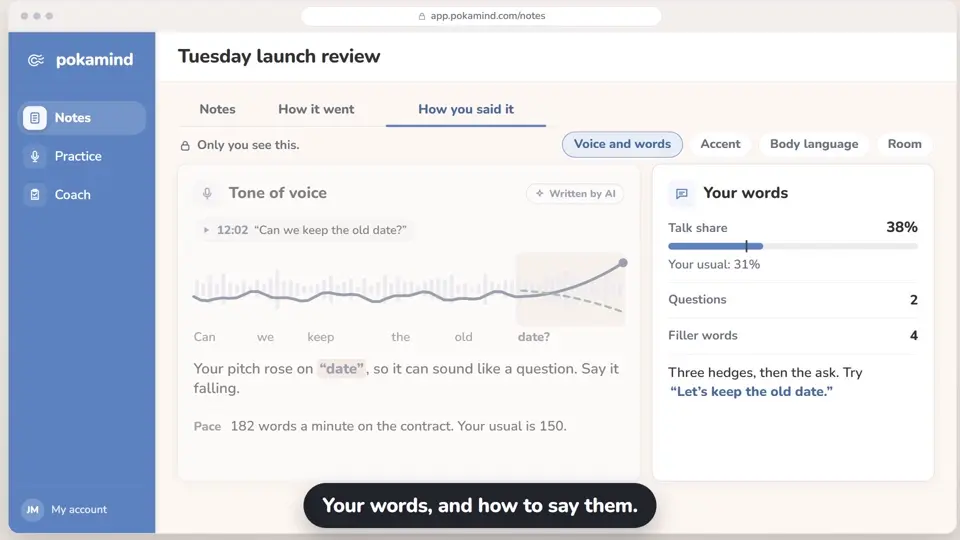
- Your pitch stayed flat on the new date. Lift it to land it.
See PokaMind Notes work
A note-taker, an AI chat and PokaMind Notes
All three give you the facts. Notes adds how it went and how you said it.
| What you get | A standard note-taker | A general AI chat | PokaMind Notes |
|---|---|---|---|
| How the meeting went, each point with the line it rests on | Not usually | If you know what to ask | Yes, after every meeting |
| Your words and turns: talk time, questions, hedges, turn-taking | Sometimes | Not usually | Yes |
| How you said it: your tone of voice, pace, accent (if you turn it on) and body language from your own camera | Not usually | Not usually | Yes |
| Framing for a cultural communication context you choose | Not usually | If you ask | Yes |
| All your meetings in the AI assistant you already use | Often | Only what you paste in | Yes, through MCP |
How the meeting went
After every meeting, Notes writes how it went from what was said and when, each point with the line and time it rests on, saying "may" where it should.
The meeting read
What was settled first, which ideas stalled based on what was said next, what is still open, and what to bring next time.
Meeting rhythm
How talk and questions were spread across the room. A picture of the meeting, never a score for anyone.
Follow-up drafts
A recap for the client and one for your team, each framed for its audience. You edit, you send.
How you said it
Notes looks at your own part of the meeting, for you: what you said and how you said it. Observable signals, never a guess at how you felt.
Your words and turns
Your talk share, questions, hedges and filler words, and whether you let others finish.
Tone of voice
Pitch, variation, volume and emphasis in your own speech, and how they can come across.
Pace and pauses
Your words a minute and where a pause would help, against your own usual.
Accent and pronunciation of your own speech
If you turn it on, Notes names the accent it hears in your own English and the sounds to practice. Only you see it, and it never looks at anyone else's speech.
Body language, on video calls
From your own camera: gaze toward the camera, gestures, posture and smiles, and what to change. What you did, never how you felt.
Cultural reference and framing
You choose the cultural context, such as a more direct or indirect style, and get references on how to frame your point for it. Notes never labels a person.
Goals you set
Pick a goal, such as fewer hedges or more questions, and track it across your meetings.
Live cues, only for you
Optional cues during the meeting on your own pace, talk time or a goal. Off unless you turn them on.
PokaMind Notes: how you said it
- Tone of voice
- Your pitch stayed flat when you named October 14. Lift it on the date to land it.
- Pace
- 182 words a minute on the contract terms. Your usual is 150.
- Accent detected in your English
- Spanish-influenced. Practice "ship" vs "sheep". "Park it" may not travel; try "pause it".
- Body language, on the call
- You looked at the camera 40% of the time and smiled twice. You leaned back during the client's objection. Stay forward while they talk.
- Your words
- Three hedges, then the ask. Cut "I think maybe" and say "Let's keep the old date." 38% of the talk, two questions.
- You set the room to: indirect style
- "Let's park the soft launch" may read as abrupt. Try "Can we come back to the soft launch on Thursday?"
All your meetings, in one place
One meeting tells you how it went. Fifty tell you what keeps happening.
Ask across your meetings
Ask what was decided with a client this quarter, across every meeting.
A brief before the next meeting
Before you meet the same people again, a short brief: what was decided, what is open, and what each person said they need, quoted.
Who said what, over time
For people you meet often, the topics they raised and positions they stated, each with the meeting and line. What they said, never a judgment of them.
Team spaces
Share a meeting or a project space with your team. You choose what is shared.
Later: A weekly digest of your meetings.
In the AI assistant you already use
PokaMind Notes connects to the AI assistant you already use, such as Claude, ChatGPT or Microsoft Copilot, through MCP. Your assistant can then look across all your meetings and spot patterns over months.
 PokaMind Notes
- MCP
- Your AI assistant
It sees only your own meetings and spaces, and you can disconnect it at any time. Once your assistant has an answer, its own terms apply.
MCP (Model Context Protocol) is an open standard that lets an AI assistant read from the tools you use, with your permission.
Notes the way you work
- Online and in the room
Connect your calendar for calls on Teams, Zoom and Google Meet. In a room, put your phone or laptop where everyone can be heard. Either way, you press record.
- Your own format
Write the instruction once, such as conclusions and actions only, and every meeting comes back that way.
- Nine languages, and translation
Notes in English, Arabic, Spanish, French, Italian, German, Catalan, Chinese and Swedish, with a translated copy in the language your reader needs.
- Export
Send notes and drafts to your email, documents, team chat or CRM.
What is kept
- The transcript, your notes and your analysis are kept. The audio is not stored.
- Speakers are labeled Speaker 1, Speaker 2 and so on, and you can name them. Labels can be wrong. Nobody is recognized by voice.
- Your notes and your analysis are visible to you. They are shared only if you choose to share them.
What Notes will not do
- It does not read how anyone felt. The read comes from what was said and when, and your feedback from observable signals of your own delivery.
- It does not label anyone's origin, ethnicity, nationality or culture. Accent detection looks only at your own speech, if you turn it on, and the cultural context is one you choose.
- It gives no per-person scores and does not compare people.
- It is not for evaluating people. Our customer terms do not allow using it to assess, rank or make decisions about employees or candidates.
- It suggests. You decide.
- You always know it is AI. Notes, reads and drafts are marked as written by AI.
- For adults at work, 18 and over. Read the privacy notice (opens in a new tab).
Who it is for
- Project and team leads: the decisions, what is still open and a brief before the next meeting.
- International teams: nine languages, your own speech in a mixed-language room, and framing for a context you choose.
- Managers, for their own meetings. Not for assessing their team.
Questions about Notes
Do you record our meetings?
Only when someone presses record in PokaMind Notes, online or in a room. The person recording must tell everyone in the meeting first, and anyone can say no. The transcript and the notes are kept. The audio is not stored. Speakers are labeled from the meeting, and you can name them. Labels can be wrong. PokaMind does not recognize anyone by voice.
How does PokaMind fit the EU AI Act?
PokaMind gives feedback on communication from observable signals: what was said and how, such as tone of voice, pace, pronunciation and body language. It does not recognize emotions, and it does not infer anyone's origin, ethnicity, nationality or cultural background. Accent detection looks only at your own speech, if you turn it on, and only you see it, and cultural framing uses a context you choose and describes communication norms, never people. The person recording must tell everyone in the meeting first, and anyone can say no. Your analysis is yours, and PokaMind may not be used to evaluate employees. You always know when you are talking to AI. PokaMind is for adults 18 and over. Read the privacy notice.
Does PokaMind read emotions, or guess anyone's origin?
No. PokaMind tells you what you did and what to change: your pitch, pace, pauses, gaze and gestures. It does not read emotions, mood, stress, personality or intent from a voice, a face or words, and accent detection looks only at your own speech, if you turn it on, and never infers where anyone is from.
Bring one meeting you run every week
In a demo, we show you what Notes gives you for it.